
Setup Feedburner Feed
I will tell you everything you need to know by the screenshot for easily understanding.
1. Login your feedburner account.
2. Type your URL and hit on the next button, See below in the screenshot.
2. Type your URL and hit on the next button, See below in the screenshot.

3. Again hit on the next button.
4. Type your blog title and feed address, Click on the next button.
5. Your feedburner feed is now live and it is now created, now again click on the next button.
6. Now tick on the Clickthroughs — How often people click items back to your site, click on the next button.
Activate Customize Feedburner Email Subscription
1. Click on the Publicize > Email Subscription tab, Copy the highlighted code and click on the save button. now paste that code into your blogger widget.
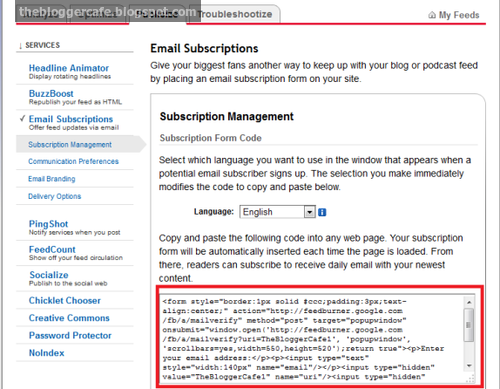
2. Go to Blogger > Layout
3. Add a gadget > Add HTML/JavaScript
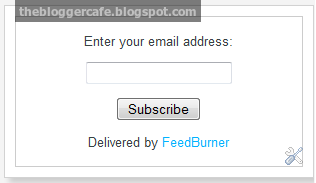
4. Paste the code into HTML/JavaScript widget. Subscribe email address box will be appear it looks like this, see below in the screenshot.
Or you can add the peace of code into HTML/JavaScript widget.
3. Add a gadget > Add HTML/JavaScript
4. Paste the code into HTML/JavaScript widget. Subscribe email address box will be appear it looks like this, see below in the screenshot.
Or you can add the peace of code into HTML/JavaScript widget.
<style>
#socialbar-subscribe-box{width:300px;border:5px solid #aaa;border-radius:3px;padding:3px 0}
.socialbar-subscribe-box-wrapper{background:url(https://blogger.googleusercontent.com/img/b/R29vZ2xl/AVvXsEgz-1DzjFHw4kIOyt28dbDI6Q6V5Kp38Z4JnwbDeTQtn5EHafOtpjECHA2u7AfwtjcyahVK__pYI6MxrwpvxR59HGUuWxhQZe_6WW0xi2tEJNTL7em7EGZlN5ma9WErNp1uTvkFyitl91A/s1600/background.png) repeat scroll 0 0 #f7f7f7;color:#111;font-size:14px;line-height:20px;padding:1px 3px 13px;text-align:center;text-transform:uppercase}
.socialbar-subscribe-box-form{clear:both;display:block;margin:10px 0}form.socialbar-subscribe-box-form{clear:both;display:block;margin:10px 0 0;width:auto}
.socialbar-subscribe-box-email-field{-moz-border-radius:4px;-webkit-border-radius:4px;background:#fff url(https://blogger.googleusercontent.com/img/b/R29vZ2xl/AVvXsEhxvTbT9Xkc97k2io6sLZemBzJ5y5TGgt65HXwyHwrRpku0CtEVdowVw5SNfg7jCW9pLleN3YR1rboaRixwKE_nCEqFNhwVz3M2Maw3Pr-ij8OT034Gq6fGKJz6_QoyqKsgQIXDHMtotFk/s1600/icons.png) no-repeat 0 -27px;border:1px solid #ccc;border-radius:4px;color:#444;margin:0 0 15px;padding:10px 40px;width:68%}
.socialbar-subscribe-box-email-button {
background: rgba(0, 153, 255, 0.31);
border: 1px solid #007fff;
-moz-border-radius: 15px;
-webkit-border-radius: 15px;
box-shadow: 0 1px 0 rgba(255,255,255,0.3) inset, 0 1px 0 transparent;
color: #fff;
cursor: pointer;
font-family: verdana;
font-weight: 700;
padding: 10px;
text-shadow: 1px 1px 0 rgba(0,0,0,.4);
text-transform: uppercase;
width: 100%;
}
.socialbar-subscribe-box-email-button:hover,.socialbar-subscribe-box-email-button:focus{background:#1ca4ff}
.socialbar-subscribe-box-email-button:active{-moz-box-shadow:0 1px 4px rgba(0,0,0,0.5) inset;-webkit-box-shadow:0 1px 4px rgba(0,0,0,0.5) inset;box-shadow:0 1px 4px rgba(0,0,0,0.5) inset;outline:0}iframe,object,embed,.yt-border iframe,.yt-border object,.yt-border embed,table{width:100%}embed{border-radius:3px;-moz-box-shadow:0 2px 4px rgba(0,0,0,0.2);-webkit-box-shadow:0 2px 4px rgba(0,0,0,0.2);background:#FFF;border:1px solid #ddd;box-shadow:0 2px 4px rgba(0,0,0,0.2);margin:0;padding:4px 4px 4px}
#footer-section{border-top:1px solid #aaa;box-shadow:inset 0 4px 6px -3px #aaa;font-family:cambria;font-size:14px;height:100px;margin:10px -30px 5px;padding:0 30px;text-align:center;width:100%}
a.social-icons{margin-right: 5px;height:45px;width:45px;}
a.social-icons:hover { opacity: .7; filter:alpha(opacity=70);}
</style>
<div id="socialbar-subscribe-box">
<div class="socialbar-subscribe-box-wrapper">
<br/>
<a class="social-icons" target="blank" href="https://www.facebook.com/earnbloggercafe" rel="nofollow"><img src="https://blogger.googleusercontent.com/img/b/R29vZ2xl/AVvXsEjLcmzN48EG1OJK8uWCpsYoUEUK6R-41mOo86jD6_87pg9yOVBWyhViso3E34ZoO1snmRiv-mS24VX_jNlpzztAm0u4kfrpsFrvhVlfUlFYLDInvBoqWwr6WTaVGsdkFFVM6QFcrvLFcenA/s1600/facebook_64.png" /></a>
<a class="social-icons" target="blank" href='http://feeds.feedburner.com/EarnBloggerCafe' rel='nofollow'><img src='https://blogger.googleusercontent.com/img/b/R29vZ2xl/AVvXsEgHtMjKyyLoHciNtvMXNn5p3kz1kV0QOY5QlQbwt1ptbabw7SzExvS4b5qyD2C5wXR9ORQOrvfuS_EGEAfY4gwXKGzrEjQwA4EgPmZCHzD2kcMZLPAL8HsnfbX4BznqsYBUw19bj071bl73/s1600/rss_64.png' title='Rss'/></a>
<a class="social-icons" target="blank" href="https://plus.google.com/108753831752159698538" rel="nofollow"><img src="https://blogger.googleusercontent.com/img/b/R29vZ2xl/AVvXsEiIG3h8RGS10xPs9RIsOLXMVKADuyskTTAA4Xb0I55F1FopS2XQqQJpoojhr3CBiULUulyPYcKH1Wa2IOXpMXxyvpphyPLWewZEHKW5rpMSNh2Zm2WIRLqAT4H68sDOZkIs7O8NiyFK3LPW/s1600/google-plus_64.png" /></a>
<a target="blank" class="social-icons" href="http://www.pinterest.com/adil100" rel="nofollow"><img src="https://blogger.googleusercontent.com/img/b/R29vZ2xl/AVvXsEheo1kJ32V6v1s-ENT_weV4HKccLieEHaAPC4swLGL-NXPtWQoBhoVt2blIAXW5UFl7ZtFdGnGnB4Vhuzqvcla4RTqQk8VDBTuZ9nA5-AYCEQQ5s4hgJi8AIM3JKimwn5PRbdc-2Y0SXlA_/s1600/pinterest_64.png" /></a>
<p><strong>Become Our Fan on Social Sites!</strong></p>
<div class="socialbar-subscribe-box-form"><form action="http://feedburner.google.com/fb/a/mailverify?uri=EarnBloggerCafe" class="socialbar-subscribe-box-form" method="post" onsubmit="window.open('http://feedburner.google.com/fb/a/mailverify?uri=TheBloggerCafe', 'popupwindow', 'scrollbars=yes,width=550,height=520′);return true" target="popupwindow"><input name="uri" type="hidden" value="TheBloggerCafe" />
<input name="loc" type="hidden" value="en_US" /><input class="socialbar-subscribe-box-email-field" name="email" autocomplete="off" placeholder="Enter Your Email Here"/>
<input class="socialbar-subscribe-box-email-button" title="" type="submit" value="Subscribe Now !" /></form></div></div></div><!--Please Do not Remove the Credits --><p style=" float:left; margin-right:35px; font-size:9px;" >Powered By <a style=" font-size:9px; color:#3B78CD; text-decoration:none;" href="http://www.earnbloggercafe.blogspot.com"><strong>Blogger Widgets</strong></a></p></div></div></div>
Customization
Please change the highlighted URL with your URL, you are almost done!
Redirect All Your Blog Feed To Feedburner
Once you setup feedburner and activate RSS email subscription for your blog than you need to redirect your blog feed. Follow the simple step.
- Go to Blogger > Other > Setting
- Enter your feedburner URL in the Post Feed Redirect URL text field.
- Hit on the save button.
- You are done.
Help
You can feel free to ask me at anytime in the below comment section.

As your interests may be distinctive yet here I am examining around few declaration and recognition courses that may help you in snappy seeking of occupation in your intrigued field. read this article
ReplyDelete